Local-first · Built for founders & indie developers

Your accountant wants every invoice.
You have better things to do.

Belegdog fetches the invoice for every bank transaction — from Gmail, Stripe, AWS and more with one click. Hours of invoice hunting become seconds. Nothing goes missing.

Download on the Mac App Store 1 month free · macOS 12+
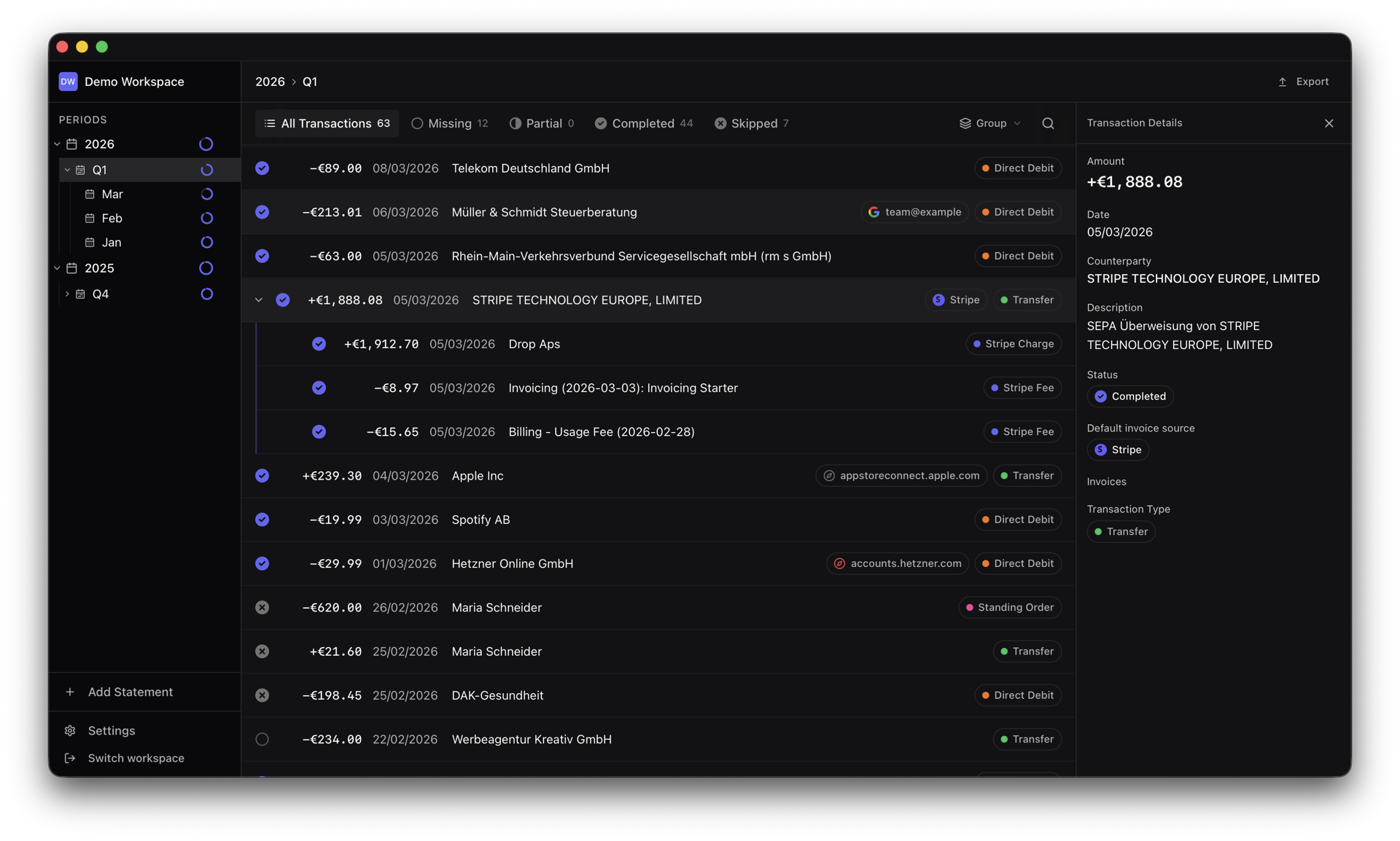
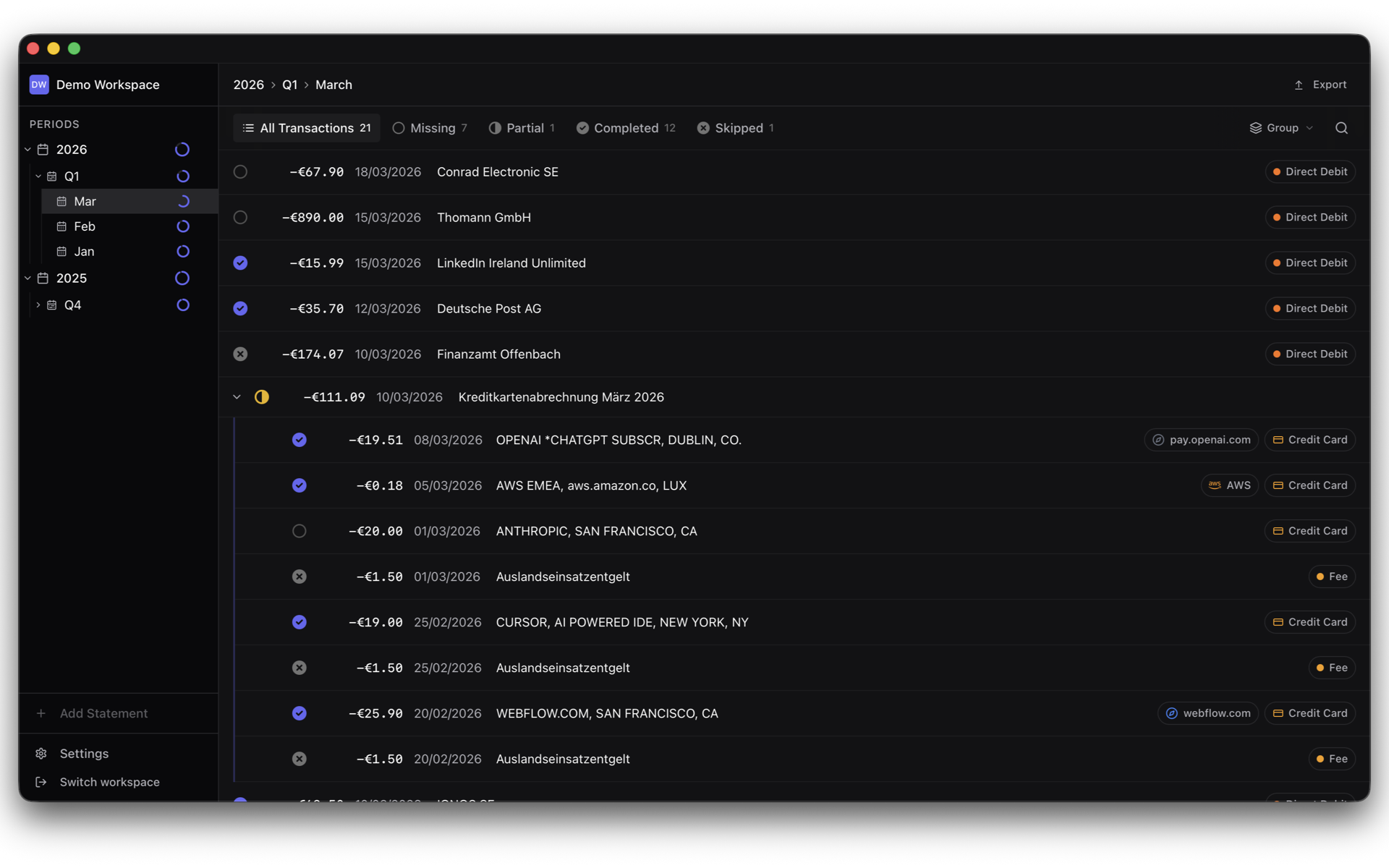
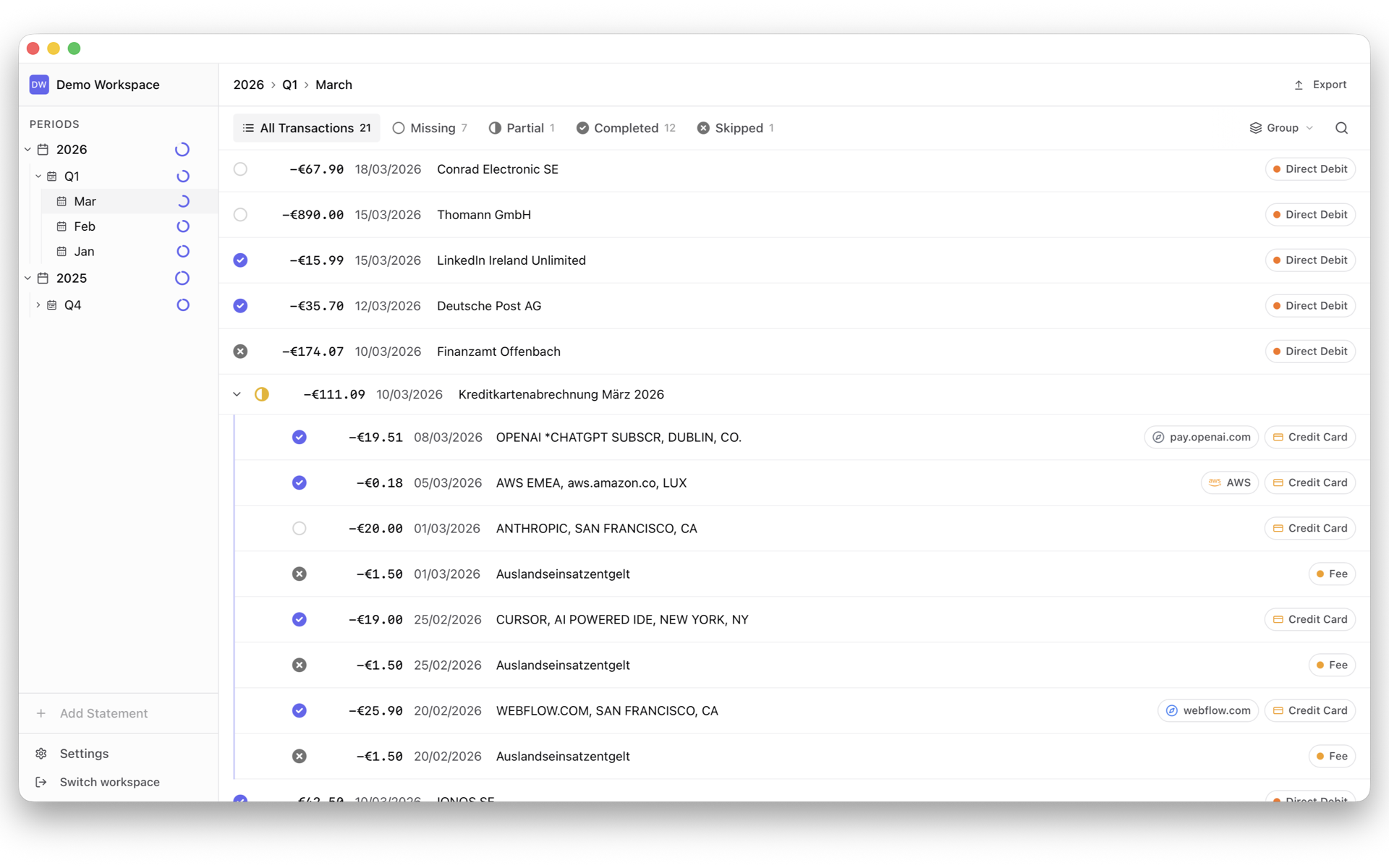
[ App screenshot — transaction list with matched invoices ] Belegdog on macOS: grouped bank transactions with matched invoices, a split Stripe payout, and the transaction inspector
The math

What this actually saves you

Every month or quarter, the same ritual: collect invoices from a dozen billing portals, match them to bank transactions, and hope nothing's missing before handing everything to your accountant. Belegdog turns each of these chores into a click.

The old way
✓ With Belegdog
Reconciling Stripe payouts
The old way
30–60 min every quarter
Download quarterly reports, cross-check every payout against charges and invoices in a spreadsheet.
✓ With Belegdog
1 sec one click
The payout is split into its charges, invoices are downloaded and attached — automatically.
Getting the monthly AWS invoice
The old way
10 min every month
Log in to the console, find Billing, locate the right month, download the PDF, rename it, file it.
✓ With Belegdog
1 sec one click
The matching invoice is fetched and attached to the exact bank transaction.
Finding invoices in your inbox
The old way
15 min every month
Search Gmail, guess the sender, guess the month, download, rename, repeat for every subscription.
✓ With Belegdog
1 sec found automatically
Belegdog searches your Gmail and pins the matching invoice email — best match on top.
Missing invoices at handoff
The old way
Days of back-and-forth
Weeks after handoff, your accountant writes: “three invoices are missing.” Back to the portals.
✓ With Belegdog
0 follow-ups
Belegdog shows exactly which transactions still lack an invoice — before anything leaves your Mac.

Add it up: hours of your month, handed back. Every month.

The engine

Integrations aren’t extras. They’re the point.

Each one exists to delete a recurring chore from your month.

Stripe

One click splits a payout into its charges and attaches every customer invoice. Quarterly reconciliation, gone.

AWS

Fetches the month’s invoice straight from AWS and matches it to the bank transaction. No console safari.

Gmail

Searches your inbox for the matching invoice email and remembers each vendor’s sender for instant hits next month.

Direct links

Save the link to wherever an invoice lives — a vendor’s billing page or account — and jump straight there when one’s due.

Drag & drop matching

Drop any PDF onto the app — Belegdog reads the amount and date and finds the matching transaction for you.

Completeness

Never hand off an incomplete folder again

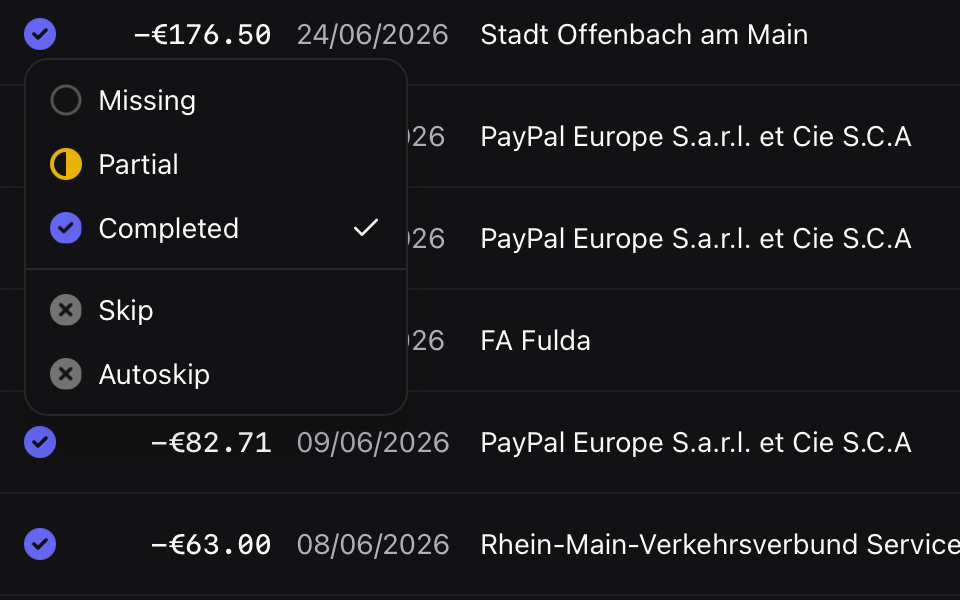
Belegdog tracks every transaction’s status per month and quarter. Missing, partial, complete — you see it at a glance, and you fix it before your accountant ever asks.

  • Missing-invoice view per period
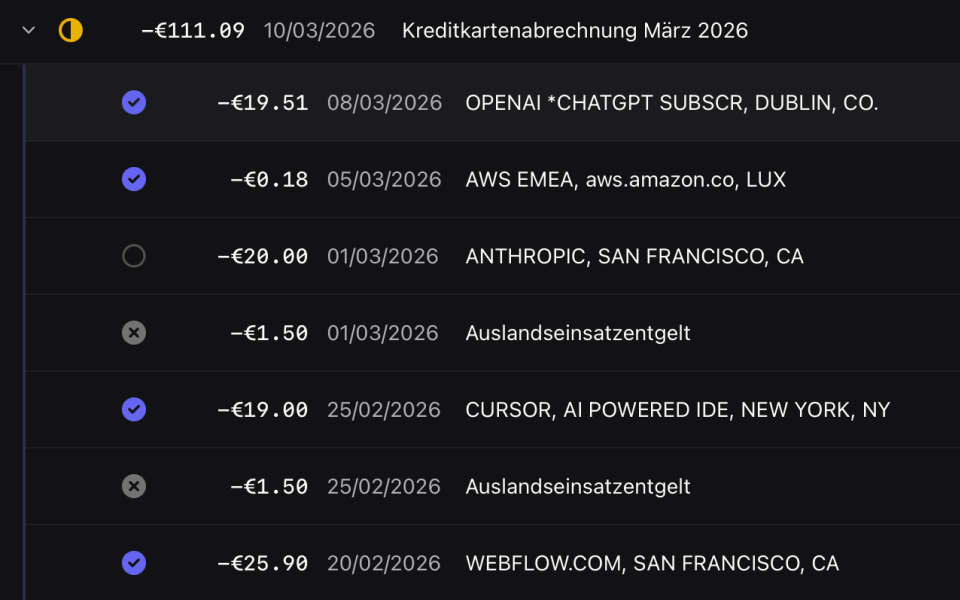
  • Credit card statements split into individual purchases
  • Auto-skip rules for transactions that never need invoices
[ Screenshot — period progress & missing invoices ] Belegdog credit card statement split into purchases, each with its own status: matched, missing, or skipped
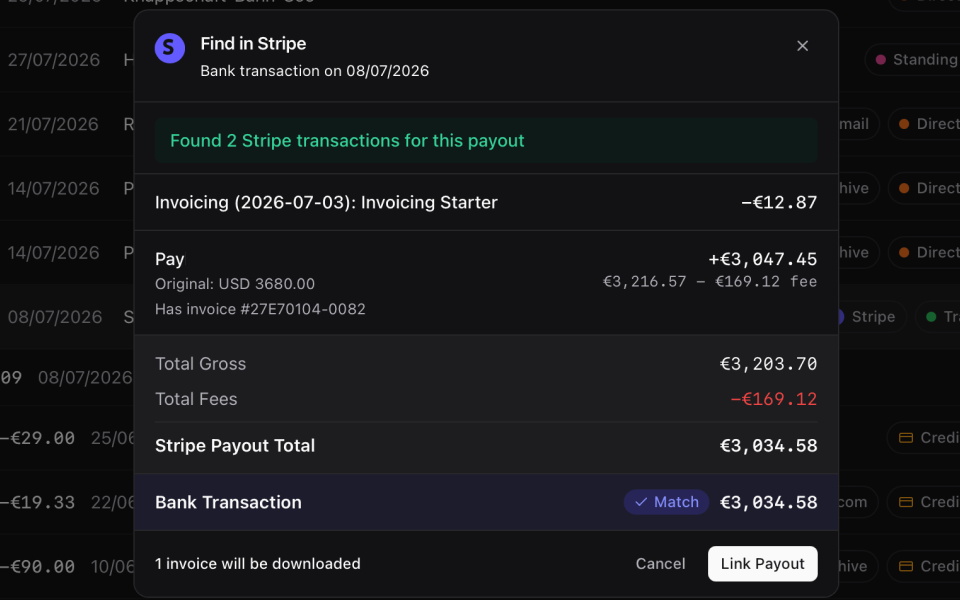
[ Screenshot — Stripe payout expanded into charges & fees ] Belegdog — Stripe payout expanded into charges & fees
Stripe payouts

One Stripe payout, fully itemized

A single payout in your bank hides dozens of charges and fees. Belegdog expands it into the individual payments behind it, pulls each customer invoice, and separates Stripe’s fees — so a lump sum becomes a clean, matched breakdown.

  • Payout split into its underlying charges
  • Stripe fees separated automatically
  • Each customer invoice attached
Skip rules

Teach it once, skip it forever

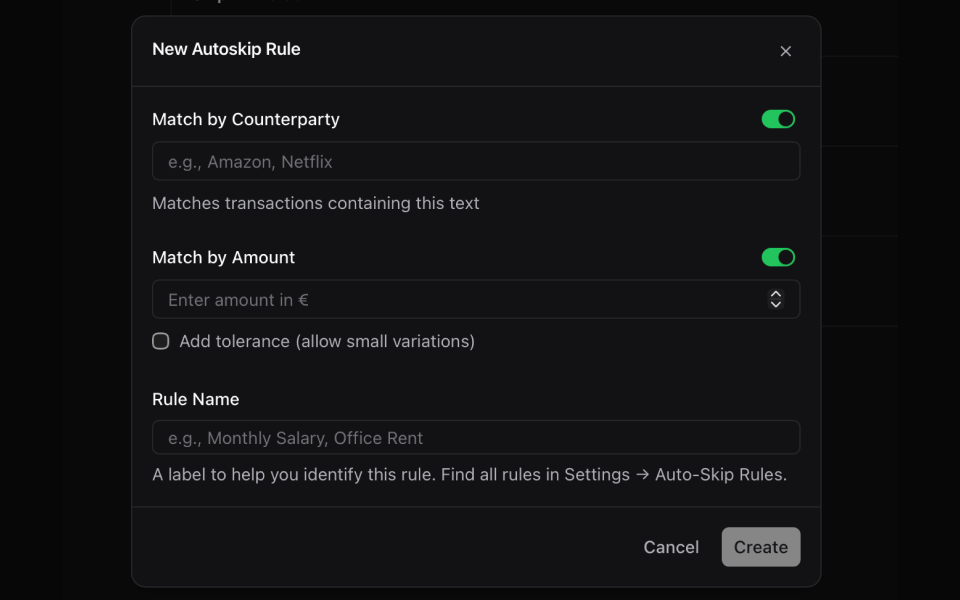
Salaries, transfers, bank fees — plenty of transactions never need a receipt. Mark one and Belegdog remembers, auto-skipping the same kind next month so your missing list only shows what actually matters.

  • Auto-skip recurring non-invoice transactions
  • Rules you can edit anytime
[ Screenshot — auto-skip rules for transactions without invoices ] Belegdog — auto-skip rules for transactions without invoices
[ Screenshot — switch between workspaces per company or account ] Belegdog — switch between workspaces per company or account
Workspaces

Every company its own space

Running more than one company or bank account? Give each its own workspace. Transactions, invoices and periods stay completely separate — nothing bleeds together, and switching is a click.

Full control

Never stuck with a wrong guess

Open any transaction to see its matched invoice, swap it, attach several, match one by hand, or mark it as needing no invoice. Belegdog does the work automatically — but you always have the final say.

[ Screenshot — transaction inspector with manual match controls ] Belegdog — transaction inspector with manual match controls
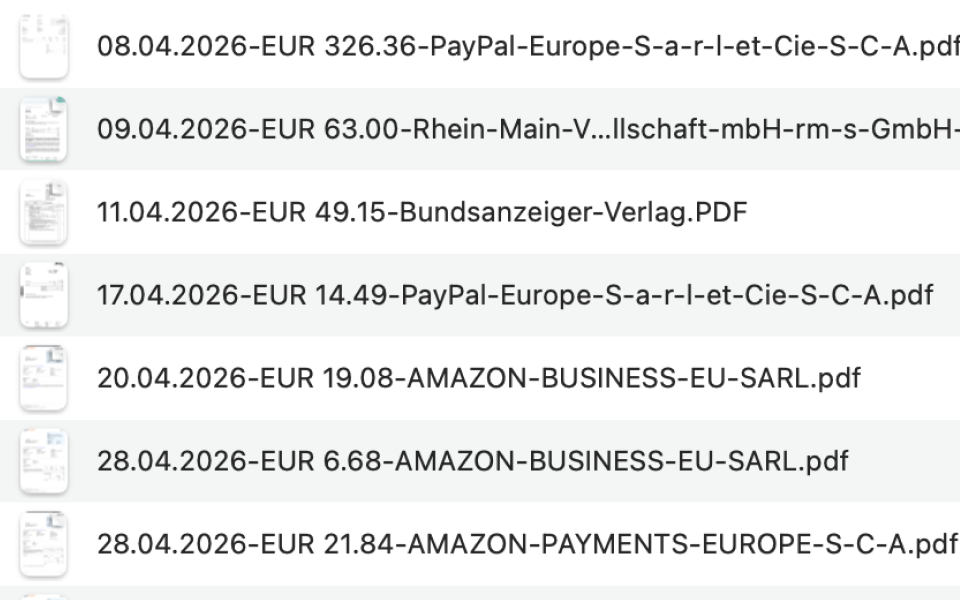
[ Screenshot — one-click export, named & organized ] Belegdog export: invoice files cleanly named by date, amount and vendor, ready for the tax accountant
Handoff

A handoff your accountant will love

Export a period as a clean ZIP: every invoice properly named, organized, and matched to its transaction. No cryptic filenames, no “which payment does this belong to?” — a smoother relationship with the person doing your books.

Design

A pleasure to open, every time

Matching receipts to payments is the task most people avoid. Belegdog is fast, thoughtfully designed, and a genuine pleasure to use — the kind of app you actually want to open. When the tool feels this good, the work stops feeling like work. Full light and dark, matching your system automatically.

[ Screenshot — light & dark ] Belegdog in dark mode Belegdog in light mode
Local-first

Your finances stay on your Mac

Belegdog is not a cloud service. There is no server, no account, no telemetry.

No cloud, ever

All data lives in a local database on your Mac. Integrations talk directly to Google, Stripe and AWS — never through our servers, because we don’t have any.

No shared logins

Stop granting your accountant access to billing sections of every SaaS you use — or paying for extra seats just for invoice access.

Credentials in the Keychain

API keys and tokens are stored in the macOS Keychain. The app is sandboxed and distributed through the Mac App Store.

Pricing

Cheaper than 10 minutes of your time

If Belegdog saves you one invoice hunt per month, it has already paid for itself.

Monthly
€5,99 / month
Cancel anytime

1 month free — long enough to hand off a full month to your accountant before you pay a cent. Billed through the Mac App Store.

FAQ

Questions

Is this accounting software?

No — and that’s deliberate. Belegdog is the missing layer between your bank account and your accountant. It replaces the manual collecting, matching and organizing of invoices. Your accountant keeps doing the books; you stop doing the hunting. It doesn’t compete with DATEV, Lexoffice or your tax advisor’s tools.

Who is it for?

Founders, indie developers and small teams who use a lot of SaaS, get paid through platforms like Stripe, and personally carry the invoice-collection burden every month — while a tax advisor does the actual bookkeeping.

How do transactions get in?

Import your bank statement (PDF or CSV). Belegdog parses the transactions, and credit card statements are split into their individual purchases automatically.

Which bank statements are supported?

Currently Deutsche Bank (Germany) — account statements and credit card statements. Using a different bank? Email us and we’ll prioritize it.

Can I manage multiple bank accounts?

Yes — through workspaces. Create a separate workspace per bank account (or per company), name it whatever you like, and switch between them anytime. Each workspace keeps its own transactions, invoices and periods — nothing gets mixed together, and it’s always clear which transaction belongs to which account.

Where is my data stored?

In a local database on your Mac — full stop. Integration credentials live in the macOS Keychain. There is no Belegdog cloud, no account, and no analytics.

Where is Belegdog developed?

In Offenbach am Main, Germany. We built Belegdog because we couldn’t find anything like it. Everything out there was either a full accounting suite — or it just didn’t solve the collect-match-hand-off loop we were stuck in every single month. So we built it for ourselves. And since we had to look at it every month anyway, we wanted it to be genuinely nice: well-designed, fast, enjoyable to use. And since we started using it ourselves, our tax accountant has never asked about a missing invoice again — and the hours we used to lose go back into building products. Win-win.

I have a question, feature request, or found a bug — where do I go?

Email us — we read everything and we’re happy to hear from you. Feature requests directly shape the roadmap.

Get your hours back.

Every minute spent hunting invoices, reconciling payouts, or answering “three invoices are missing” emails is a minute you’re not building your product. That’s the trade Belegdog ends.

Download on the Mac App Store 1 month free · Local-first · Cancel anytime · macOS 12+